
AI-Powered
Development Tools
Transform Unity and video editing workflows with natural language.
200+ professional tools. Zero maintenance cost.
Synaptic AI Pro for Blender
Revolution comes to Blender. VRM/VRChat avatar editing with natural language.
Complex inputs, effortless control.
Exploration across a serene open field
Running sequence showcasing responsive camera and input
Token SuperSave Mode
350 Tools. 3 Commands.
99% Context Reduction
99% Context Reduction
350+ tools consolidated into 3 meta-tools. Dramatically reduces token consumption.
Universal Compatibility
No dynamic tool loading required. Works with Claude Desktop, Cursor, VS Code, and more.
Smart Design
Access all features via list_categories → list_tools → execute flow.
Thank you for your support!
Since launch, developers around the world have chosen Synaptic AI Pro. We're aiming for 1,000 DL next and continuing to improve features.
Synaptic enters a new era
One-touch setup and dynamic tool support.
The best experience across all AI development environments.
Full VS Code Support
Perfect integration with GitHub Copilot via dynamic tool loading
One-Touch Setup
Automatically configure Cursor and VS Code. No manual setup needed
Prompt Caching
~150-200 calls/session (Claude Sonnet 4.5). First: 57K tokens, then ~500-600 avg. 99% reduction.
Built in Just a Few Conversations
This is what you get in one shot. Just told Claude Opus 4.5: 'When touching an enemy, transition to battle scene and build a Dragon Quest-style battle UI and system.' Keep the conversation going for even more advanced systems.
Battle System
Dragon Quest-style turn-based battle, encounters, scene transitions
Camera Work
Dynamic camera movement, field movement follow camera
UI Building
Command menu, damage display, battle text
BGM is self-made, characters created with VRoid Studio. Field uses placed assets with terrain adjustments (also controllable via instructions). Continue the conversation flow for even more advanced development.
Understand.
Transform.
Ask 'Tell me about this game' for detailed analysis. Say 'Make the camera more dynamic' to optimize Cinemachine settings. Request 'Add new enemy characters' to integrate them into the battle system. Enhance and modify existing projects with natural language.
Improve Character Controls
Adjust VRM avatar expressions, fine-tune movement speed, change jump force, optimize input mapping—all with natural language commands
Add New Levels
Say 'Add a forest area' to place NatureStarterKit2 assets, auto-configure fade transitions, and remember positions with SceneMovementData
Extend Combat System
Simply instruct 'Place 3 enemies with 100 HP and 20 attack power' to add and configure enemy characters in the LetsGoBattle system
Enhance Visuals
Request 'Change to sunset lighting,' 'Add fog effects,' or 'Make character eyes blue'—visual adjustments applied instantly
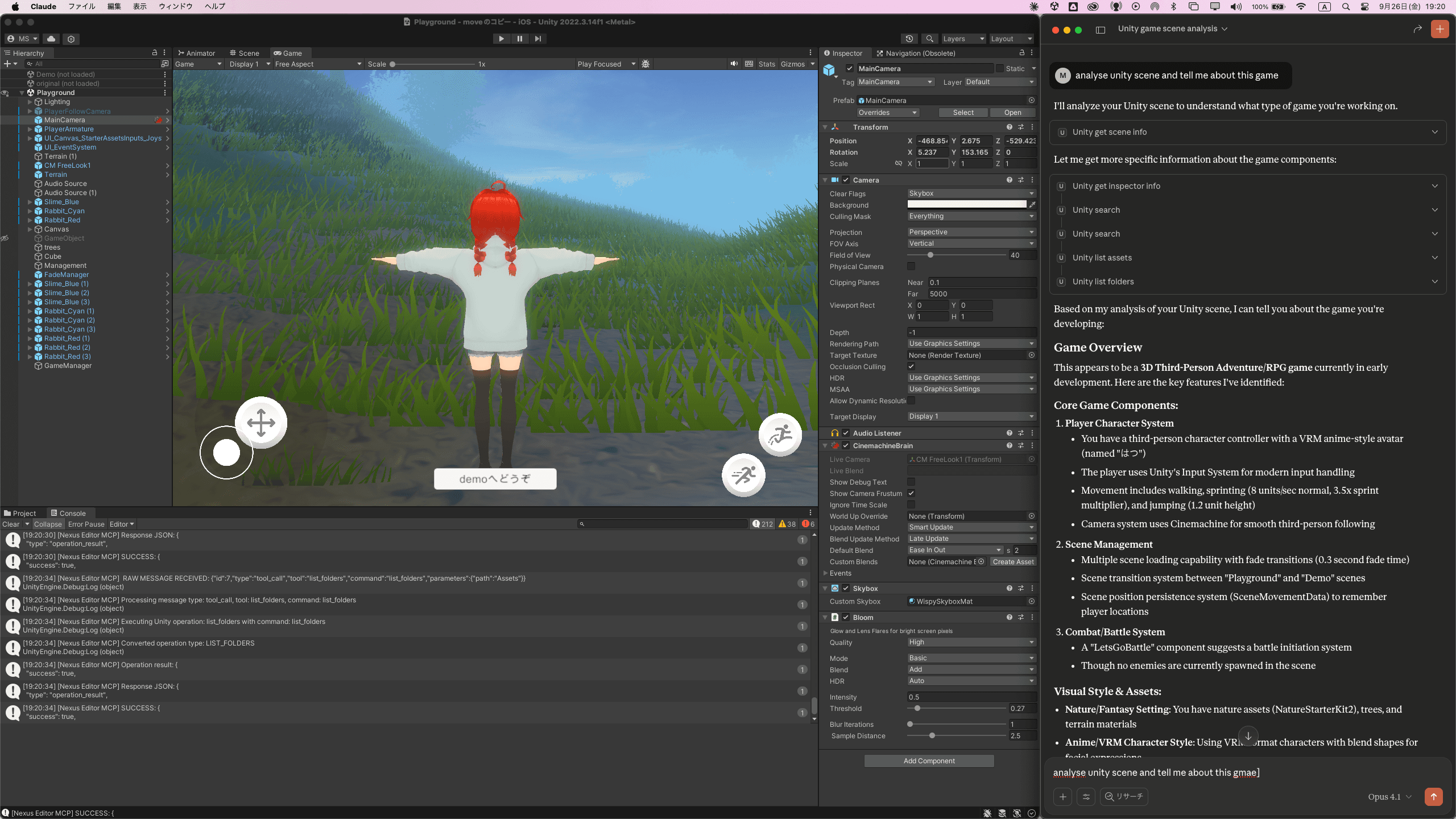
Connected in 10 seconds.
Just 3 steps
No complex configuration needed. Just click a button and AI connects to Unity automatically.
Import
Import the UnityPackage
Click Button
Press 'Complete MCP Setup'
Connected
Auto-connects to Claude Desktop/VS Code/Cursor
Works with Your Favorite AI Tools
One-Click Setup for All Platforms
Automatic configuration for desktop AI apps and IDEs. No manual JSON editing required.
Desktop AI Apps
AI-Powered IDEs
AI CLI Tools
v1.1.4+Pro OnlyTerminal and CLI-based Unity control via HTTP endpoints. No MCP configuration required.
One-Click Configuration
Automatically generates config files for all detected tools
Smart Merge
Preserves your existing MCP servers and settings
Ready in Seconds
Just restart your AI tool and start using Unity commands
Configuration Files
Looking for a lighter version?
87 carefully selected tools for indie developers. Perfect entry point to AI-assisted Unity development.
Essential
87 tools- ✓Covers 90% of daily tasks
- ✓Same easy one-click setup
- ✓Full C# scripting support
Pro
200+ tools- ✓HTTP API + CLI Supportv1.1.4
- ✓GOAP AI Behavior System
- ✓VFX Graph / Shaders
- ✓Weather / Time Systems
Why We're Different
Clear advantages over traditional tools
Setup Time
One-click automatic setup vs Complex manual configuration
Pricing Model
Pay once, use forever vs Continuous monthly fees
Tool Count
Complete development environment vs Limited functionality
AI Features
Create NPC/CPU AI with plain English: "Attack when see enemy, flee when health is low"
GOAP (Goal-Oriented Action Planning) lets you define complex NPC and enemy AI behaviors using natural language. Replace hundreds of lines of AI code with simple English instructions.
Professional MCP Tools
Payment Information
All transactions are processed in JPY (¥) via Square. Prices shown are automatically converted to your local currency for reference.
Synaptic AI Pro for Unity
Control Unity Editor with natural language. 200+ tools for GameObject creation, scene management, AI systems, and more.
- GOAP AI System with natural language control
- One-click setup (10 seconds)
- Works with Claude Desktop, VS Code, Cursor
Synaptic AI Pro for Blender
Control Blender with natural language. 389 tools for VRM/VRChat avatar creation, animation, modeling, and more.
- Full VRM/VRChat avatar editing support
- Auto animation & shape key generation
- Works with Claude Desktop, VS Code, Cursor
Synaptic AI Pro for Unreal Engine
IN DEVELOPMENTControl Unreal Engine 5 with AI. Blueprint generation, level design, material creation, and more.
- Natural language Blueprint generation
- Automatic Niagara effect creation
- Auto landscape generation
Synaptic AI Pro for DaVinci Resolve
IN DEVELOPMENTFully automate DaVinci Resolve with AI. Local Whisper transcription, auto color grading, effect generation, and more.
- Local Whisper (no API costs, privacy-first)
- AI-powered auto color grading
- Natural language timeline editing
Synaptic AI Pro for Premiere Pro
IN DEVELOPMENTStreamline Premiere Pro with AI. Auto cut editing, effect application, export optimization, and more.
- Full After Effects integration
- AI-powered auto scene cutting
- Project template auto-generation
Why Synaptic Pro?
Zero Maintenance Cost
No external API dependencies. Everything runs locally. Buy once, use forever.
Privacy First
Your data never leaves your machine. No cloud uploads, no tracking, no telemetry.
Natural Language
Just type what you want. No complex commands or scripting required.
Ready to transform
your workflow?
Join thousands of developers and creators using Synaptic Pro.
Get Started Today